
How Other Platforms Deal With Images In Markdown
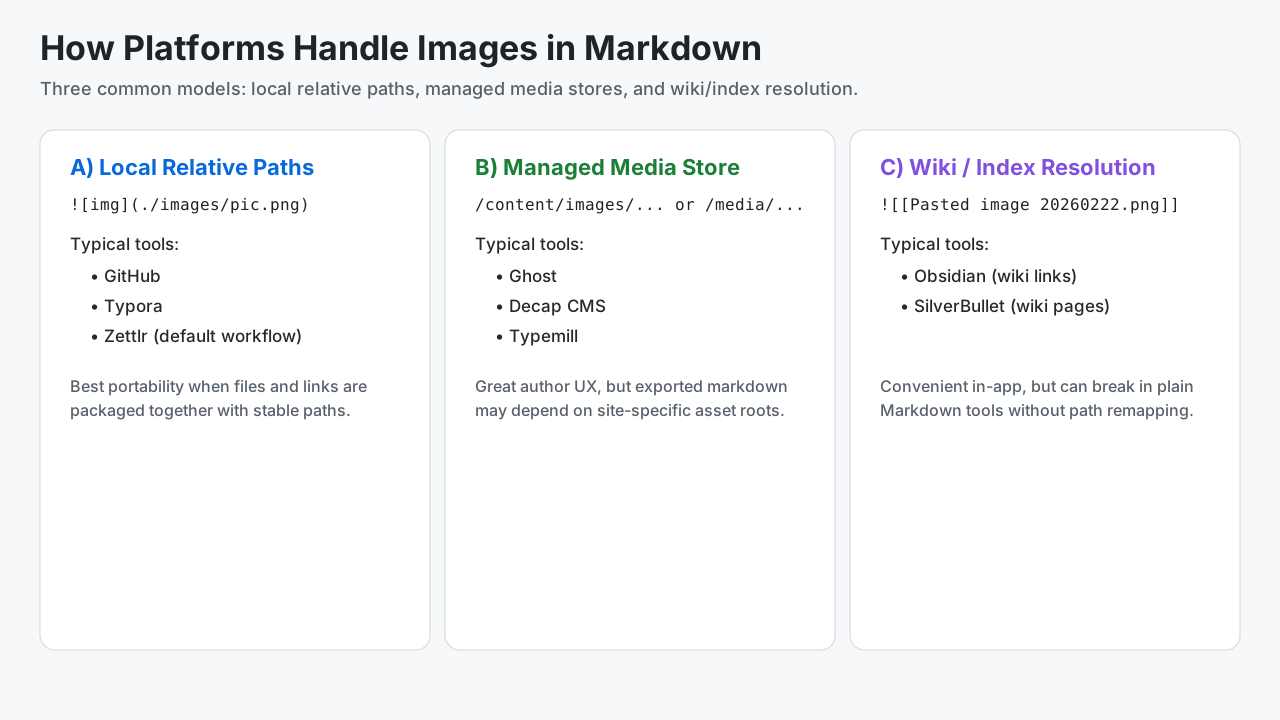
Different platforms handle embedded images differently. Some store plain relative links next to the markdown file, some route everything through a managed media store, and some use wiki-style references that require app-specific resolution.
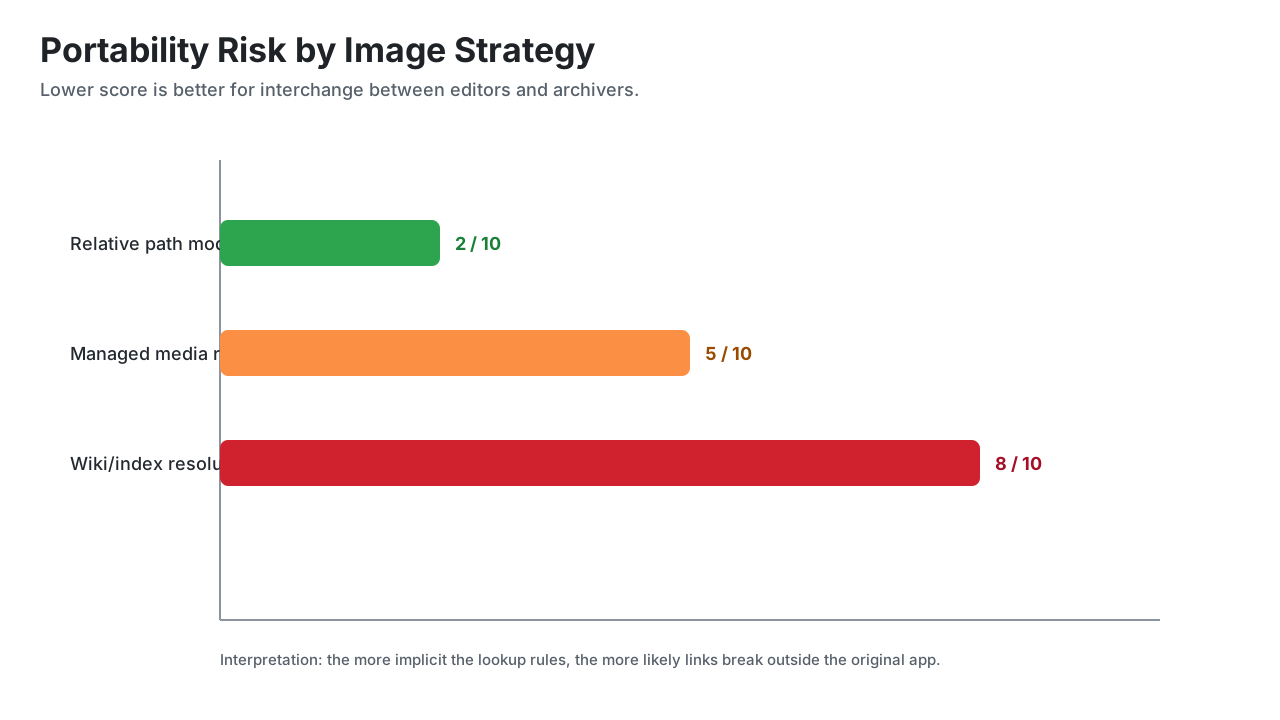
This matters for .mdz: the more explicit the path in markdown, the easier the package is to move between tools.
Quick comparison
Legend:
- Model:
?? Relative local|??? Managed media|?? Wiki/implicit - Difficulty:
?? Low|?? Low-Medium|?? Medium|?? Medium-High/High
| Platform | Model | Typical image syntax in markdown | Where image files live | Portability difficulty | Could benefit from .mdz support |
|---|---|---|---|---|---|
| Wikipedia | ?? Wiki/implicit |
[[File:...]] wiki markup |
Wikimedia media backend | ?? High | Low |
| GitHub | ?? Relative local |
 |
Repo files (or remote URL) | ?? Low | Medium |
| Decap CMS | ??? Managed media |
Markdown with relative or configured media paths | Repo media folder (config-driven) | ?? Medium | High |
| Ghost | ??? Managed media |
Markdown/HTML pointing to Ghost content URLs | Ghost content store/CDN | ?? Medium-High | High |
| Typemill | ??? Managed media |
Markdown with uploads/media paths | CMS media/uploads paths | ?? Medium | High |
| Obsidian (Same folder as current file) | ?? Relative local (+ wiki supported) |
![[image.png]] or  |
Same folder as the note | ?? Low-Medium | Medium |
| Obsidian (In subfolder under current folder) | ?? Relative local (+ wiki supported) |
![[image.png]] or relative markdown path |
Per-note subfolder (e.g. attachments/) |
?? Medium | High |
| Obsidian (Vault folder) | ??? Managed media (+ wiki supported) |
![[image.png]] or root-style markdown path |
Central vault-level attachment area | ?? Medium-High | High |
| Obsidian (Specific configured folder) | ??? Managed media (+ wiki supported) |
![[image.png]] or configured path references |
Fixed configured attachment folder | ?? Medium-High | High |
| Markdown Monster | ?? Relative local |
Standard markdown image links | Local files, project-relative paths, or web URLs | ?? Low-Medium | Medium |
| Zettlr | ?? Relative local |
Standard markdown image links | Local files relative to note/project | ?? Low | Medium |
| Typora | ?? Relative local |
Standard markdown image links | Local folder or configured upload target | ?? Low-Medium | Medium |
| SilverBullet | ?? Wiki/implicit |
Wiki/page references and attached files | Space-backed content/files | ?? Medium-High | High |
Visual models
Platform details
Wikipedia
- Uses MediaWiki wiki syntax and templates, not plain markdown semantics.
- Images are generally referenced as wiki resources (
[[File:...]]) resolved by the wiki engine. - Result: exported markdown-like text usually needs conversion logic to render images elsewhere.
GitHub
- Uses CommonMark/GFM image syntax (
). - Works best when image files are committed with stable relative paths.
- Result: very portable into
.mdzwhen local image assets are included.
Decap CMS (formerly Netlify CMS)
- Authors markdown in a Git-backed CMS UI.
- Media handling is config-based (
media_folder,public_folder), so authored paths can be relative or site-root style. - Result: portable when media files are included and path mapping stays consistent.
Ghost
- Ghost editor stores image uploads in Ghost-managed storage and injects references into post content.
- References may be absolute site URLs or Ghost content paths.
- Result: markdown moved outside Ghost often needs path rewriting or asset export.
Typemill
- CMS workflow with media management tied to the site/content structure.
- Markdown commonly references media paths that are valid in Typemill's runtime layout.
- Result: good within the CMS, but path assumptions may need adjustment when archived.
Obsidian
- Supports both standard markdown image links and wiki embeds (
![[...]]). - Attachment location is configurable: same folder, subfolder under current folder, vault folder, or a fixed configured folder.
- Result: wiki embeds are convenient but need resolver logic or rewrite to plain paths for maximum interoperability.
Markdown Monster
- Uses standard markdown image syntax with local relative paths, absolute paths, or remote URLs.
- Common desktop workflow is file-system-centric, so images are often stored beside content or in project folders.
- Result: typically portable when relative links are used and assets are bundled with the markdown.
Zettlr
- Primarily uses standard markdown links with local files.
- Typical workflow keeps assets near notes or in project folders with relative references.
- Result: generally portable and
.mdz-friendly.
Typora
- Uses standard markdown links; can auto-copy pasted images to a configured local folder.
- Can also integrate with upload targets depending on settings/plugins.
- Result: strong portability when configured for local relative files.
SilverBullet
- Wiki-oriented editing with page/file resolution behavior tied to the SilverBullet space model.
- References can be implicit compared with strict markdown-relative file paths.
- Result: may require normalization when moving content to generic markdown toolchains.
Packaging guidance for .mdz
- Prefer standard markdown image syntax:
. - Keep image files in the package and preserve relative structure.
- If source uses wiki-style embeds, normalize them during pack time when possible.
- Validate unresolved image references before archive creation.
- Include a manifest that records any path rewrites or mapping decisions.
When shared image sources are better
For some workflows, isolating images inside an archive is not the right default.
- Single source of truth: teams may want one canonical image asset (logo, diagram, policy graphic) referenced across many docs.
- Frequent asset updates: centrally hosted images can update once and propagate everywhere without rebuilding archives.
- Size and duplication: large repeated media can bloat many
.mdzfiles if each archive carries a copy. - Governance and rights: organizations may need centralized retention, access controls, and audit policies on media.
- CDN/performance use cases: web publishing often benefits from shared caches, responsive variants, and optimized delivery pipelines.
Practical stance: use .mdz for portability, offline reliability, and immutable handoff; use shared media sources when centralized change control and reuse matter more.
Why this matters for MDZip
MDZip can preserve complex markdown projects, but archive portability improves when image references are explicit and local. The TypeScript core (mdzip-core) can help by validating links and optionally normalizing platform-specific patterns during packaging.
This page renders from how-others-deal-with-images.mdz (MDZip, ~6 KB, updated 2026-10-20) — one self-contained file. Download it, open it in the web editor, or read how these pages are made.