 MDZip.org
MDZip .mdz
A portable, cross-platform, AI-friendly file format and ecosystem for packaging Markdown, images, and metadata into a single archive.


What is an .mdz file?
document.mdz
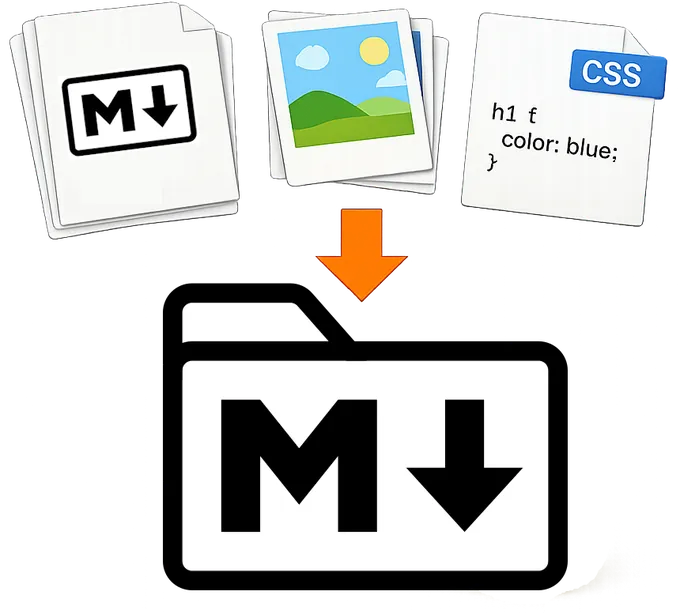
 ├── index.md          # entry point
 ├── manifest.json     # optional
 └── images/
    └── cover.png
An .mdz file is a ZIP archive with an .mdz extension and a defined structure for packaging one or more Markdown documents,
their assets, and optional metadata in a single self-contained file.
Think of MDZip (.mdz) like...
One document
- Markdown that keeps its assets - A Markdown file packaged with everything it references — images, SVGs, diagrams, PDFs, stylesheets.
- DOCX without Word - Why reach for Word when all you want is basic formatting with images?
- EPUB for Markdown - a portable package of content with images, and metadata, but with Markdown instead of XHTML.
Or a whole project
- A portable Markdown project - an ebook, a documentation site, a wiki — a folder of
.mdfiles and assets packaged into a single file.
Quick Steps to Create an .mdz File:
1 Markdown + images + whatever in a folder, with an index.md at the top
➜
2 ZIP the folder's contents (not the folder itself)
➜
3 Rename to .mdz.
.mdz adds a flexible contract so tools can open the right file every time.
MDZip tools always write a manifest file that names the entry point and describes the contents and metadata of the .mdz archive. It's optional for a hand-made archive, though. No manifest? Tools fall back to index.md, or the single Markdown file at the root if there's only one — otherwise they'll ask you to add a manifest to disambiguate.
Quick Steps to View an .mdz File:
.mdz file to .zip (or just open it with a ZIP tool directly)..md file with a compatible viewer that can resolve relative paths.Use cases
- A working file you refine with AI — Pull a user story from Azure DevOps or GitHub into an
.mdz(an AI assistant with that tracker's MCP server can do the fetching), then work on it with the assistant: break it into tasks, write down open questions and their answers, link related stories, add a diagram or screenshot. The assistant reads and edits the archive through the MDZip MCP server in VS Code. When it's ready, the refined story goes back to the tracker, and the.mdzcan stay in the repo, become a design doc, or be shared. One person owns the file, so there's nothing to merge. Docs a team co-edits in a repo can stay plain.md. See how it works. - Documents that travel — A spec, report or handbook with its images, sent as one attachment, uploaded anywhere, archived, or handed to an AI agent as context. Whoever gets it opens it in Studio, VS Code or a browser, or just unzips it, and an agent gets the text and every image it uses without re-linking anything. Like any file from someone else, treat what's inside as untrusted input.
It also works for:
- Obsidian notes that keep their pictures — An Obsidian note's pasted images are separate files somewhere in the vault, so a note sent elsewhere arrives without them. With the MDZip plugin, the note and its images are one
.mdzthat opens in Studio, VS Code or a browser with every picture in place. - Specs, requirements and stories with their pictures — A spec, a requirements doc, a user story or a design note, kept together with its screenshots, diagrams and attached PDFs, so it opens the same in any editor or tool without broken image links.
- Book — Each chapter as its own
.mdfile, packaged with a cover image, illustrations, and assets into a single portable file. - Multi-page documentation — A MkDocs-style docs site with each section as a separate file, packaged for sharing, archiving, or later rendering.
- Web pages authored as
.mdz— Write each page as an.mdzwith its own images, and let the site build turn it into HTML. Many pages on this site are made that way, and each has a link to download its.mdz.
The rest of this site covers the format and the project, with examples and tools for creating and viewing .mdz files.
Where to go next
- The Problem — what
.mdzis solving - Getting Started — open, create, and validate your first
.mdz - File Format — archive layout and manifest behavior
- Tools — Studio, the CLI, VS Code, browser tools, and developer libraries
- Project — architecture diagram, repos, and release status
- Demos — create/package/render examples and live demo links
- FAQ — practical questions and answers about
.mdz - Contribute — integrations and roadmap
Markdown resources
Useful references for Markdown syntax, compatibility, and implementation details.
- Daring Fireball: Markdown — The original Markdown project.
- CommonMark Specification — A widely used Markdown specification.
- GitHub Flavored Markdown (GFM) Spec — CommonMark plus widely used extensions like tables and task lists.
- Markdown Guide — practical syntax examples and tooling guidance.
- Classic Books in Markdown — public-domain books in Markdown format, useful for real-world examples and testing.